Search This Blog

API to Update Supplier Sites and assign Tax code in Oracle apps

API to Update Supplier Sites and assign Tax code in Oracle apps

oracle ebs r12


DECLARE

v_api_version   NUMBER;
v_init_msg_list VARCHAR2(200);
v_commit VARCHAR2(200);

v_validation_level NUMBER;
x_return_status VARCHAR2(200);

x_msg_count NUMBER;

v_vendor  NUMBER;

x_msg_data VARCHAR2(200);

l_vendor_site_rec apps.ap_vendor_pub_pkg.r_vendor_site_rec_type;

l_existing_vendor_site_rec ap_supplier_sites_all%ROWTYPE;

v_vendor_site_id NUMBER;

v_calling_prog VARCHAR2(200);

v_error_flag  VARCHAR2(200):='N';

v_error_message  VARCHAR2(4000):='N';

cursor c is

select VENDOR_NAME,TAX_REGISTRATION_NO,TAX_CODE from XX_VENDOR_SITES_STG
GROUP BY VENDOR_NAME,REMITTANCE_EMAIL,TAX_CODE;

CURSOR C1(P_VENDOR VARCHAR) IS SELECT VENDOR_SITE_ID
FROM ap_supplier_sites_all assa
WHERE assa.vendor_id =P_VENDOR;


BEGIN


for i in c loop

BEGIN

v_error_flag:='N';

v_error_message:=null;
select vendor_id into v_vendor from ap_suppliers

 where upper(vendor_name)=upper(i.VENDOR_NAME);

EXCEPTION

WHEN OTHERS THEN

v_error_flag:='Y';

v_error_message:='Unable to find the supplier site information for site id';

DBMS_OUTPUT.put_line('Unable to find the supplier site information for site id' ||v_vendor_site_id);

END;

IF v_error_flag='N' THEN

FOR J IN C1(v_vendor) LOOP

fnd_global.apps_initialize(610970,50111,200);

mo_global.init('SQLAP');


fnd_client_info.set_org_context(4556);

v_api_version := 1.0;

v_init_msg_list := fnd_api.g_true;


v_commit := fnd_api.g_true;

v_validation_level := fnd_api.g_valid_level_full;

v_vendor_site_id := J.VENDOR_SITE_ID; -- to be end dated

v_calling_prog := 'Supplier Tax code Update';


l_vendor_site_rec.vendor_site_id := l_existing_vendor_site_rec.vendor_site_id;

l_vendor_site_rec.last_update_date := SYSDATE;

l_vendor_site_rec.last_updated_by := 6147023;

l_vendor_site_rec.vendor_id := l_existing_vendor_site_rec.vendor_id;

l_vendor_site_rec.org_id := l_existing_vendor_site_rec.org_id;

l_vendor_site_rec.vat_code :=I.TAX_CODE;

l_vendor_site_rec.AUTO_TAX_CALC_FLAG:='Y';

l_vendor_site_rec.VAT_REGISTRATION_NUM:=I.TAX_REGISTRATION_NO;


AP_VENDOR_PUB_PKG.UPDATE_VENDOR_SITE(p_api_version => v_api_version,

p_init_msg_list => v_init_msg_list,

p_commit => v_commit,

p_validation_level => v_validation_level,

x_return_status => x_return_status,

x_msg_count => x_msg_count,

x_msg_data => x_msg_data,

p_vendor_site_rec => l_vendor_site_rec,

p_vendor_site_id => v_vendor_site_id,

p_calling_prog => v_calling_prog);


DBMS_OUTPUT.put_line('X_RETURN_STATUS = ' || x_return_status);

DBMS_OUTPUT.put_line('X_MSG_COUNT = ' || x_msg_count);

DBMS_OUTPUT.put_line('X_MSG_DATA = ' || x_msg_data);

END LOOP;

UPDATE XX_VENDOR_SITES_STG
SET STATUS='SUCCESS'
WHERE VENDOR_NAME=I.VENDOR_NAME;

END IF;

IF v_error_flag='Y' THEN

UPDATE XX_VENDOR_SITES_STG
SET STATUS='ERROR',
ATTRIBUTE1=v_error_message
WHERE VENDOR_NAME=I.VENDOR_NAME;

END IF;

COMMIT;
END LOOP;

END;

how to Clear the Oracle Applications cache


Clear the Oracle Applications cache

clear oracle application cache


Every time you change user assignments to a user group, clear the Oracle Applications cache so that users logging into Oracle eBusiness Suite R12 see only the appropriate options. (Note that if you do not clear the cache, users may be able to see the wrong options but they cannot actually do them.)

  1. Log in as an Oracle ebs R12 user with the Functional Administrator responsibility. 
  2. The Security tab's Grants screen appears.

    Note:

    You can also log in as the sysadmin user if you do not want to assign the Functional Administrator responsibility only for the purpose of clearing cache.

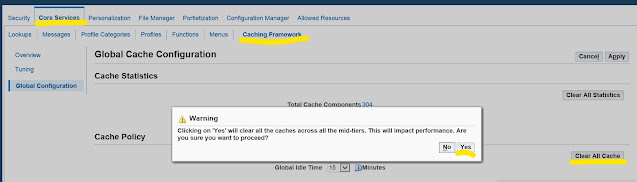
  3. Click the Core Services tab from the Grants screen. The Lookup Types screen appears.
  4. Click Caching Framework from the list of secondary tabs. The Overview screen opens.
  5. Click Global Configuration from the left panel. The Global Cache Configuration screen opens.
  6. Click Clear All Cache. A warning appears.

    Click Yes.

Tables Used by Concurrent Request Concurrent Program

 Tables Used by Concurrent Request Concurrent Program


oracle ebs r12

FND_CONCURRENT_REQUESTS

Contains a complete history of all concurrent requests (both past history and those scheduled to run in the future).


FND_RUN_REQUESTS

Stores information about the reports in a report set that a user submits including the report set’s parameter values.


FND_CONC_REQUEST_ARGUMENTS

Records all arguments passed by Concurrent Managers to concurrent requests as those requests are running.


FND_DUAL

Records when a request does not update any database tables.


FND_CONCURRENT_PROCESSES

Records information about Oracle Applications processes and OS processes.


FND_CONC_STAT_LIST

Collects runtime performance statistics for concurrent requests.


FND_CONC_STAT_SUMMARY

Contains Concurrent Program performance statistics generated by the Purge Concurrent Request program or the manager data program. These programs use the data in FND_CONC_STAT_LIST to compute these statistics।

Query to find Concurrent Request Details from Concurrent Program Name


SELECT
   distinct user_concurrent_program_name,
    responsibility_name,
    request_date,
    argument_text,
    request_id,
    phase_code,
    status_code,
    logfile_name,
    outfile_name,
    output_file_type,
    hold_flag,
    user_name
FROM
    fnd_concurrent_requests fcr,
    fnd_concurrent_programs_tl fcp,
    fnd_responsibility_tl fr,
    fnd_user fu
WHERE
    fcr.CONCURRENT_PROGRAM_ID = fcp.concurrent_program_id
    and fcr.responsibility_id = fr.responsibility_id
    and fcr.requested_by = fu.user_id
    --and user_name = upper('SYSADMIN')
    and user_concurrent_program_name in 
('Active Users')
    and Phase_code='P'
ORDER BY REQUEST_DATE DESC;