Query for banks list in oracle ebs r12
select * from ce_banks_v
Query for banks branch list in oracle ebs r12
select * from ce_bank_branches_v
A place for Oracle Consultants to find help.
select * from ce_banks_v
select * from ce_bank_branches_v
The following query will return the invoices + receipts. There is a challenge some time the link between XLA tables and GL are not completed and we don't have the correct records.
So we can find the reason, that which part is missing.
/* ===========================================================
Combined AR Audit: Invoices + Receipts → XLA → GL
=========================================================== */
SELECT *
FROM (
/* -------------------------------
PART 1: AR INVOICES
------------------------------- */
SELECT
-- 'INVOICE' AS record_type,
DISTINCT
ac.customer_name,
gjh.je_category,
rcth.trx_number,
rctlgd.gl_date,
rcth.trx_date AS "transaction_date",
( SELECT original_invoice.trx_number AS original_invoice_number
FROM AR_RECEIVABLE_APPLICATIONS_all ara
JOIN
RA_CUSTOMER_TRX_ALL applied_cm ON ara.customer_trx_id = applied_cm.customer_trx_id
JOIN
RA_CUSTOMER_TRX_ALL original_invoice ON ara.applied_customer_trx_id = original_invoice.customer_trx_id
WHERE applied_cm.customer_trx_id = rcth.customer_trx_id
) applied_to,
b.name "GL Batch no",
kc.concatenated_segments as "Account",
xlal.accounting_class_code,
NVL(gjl.accounted_dr,0) AS "ACCOUNTED_DR",
NVL(gjl.accounted_cr,0) AS "ACCOUNTED_CR",
CASE
WHEN xdl.source_distribution_id_num_1 IS NULL THEN 'NO_XLA_LINK'
WHEN xlah.ae_header_id IS NULL THEN 'LINKED_NO_HEADER'
WHEN xlal.ae_line_num IS NULL THEN 'HEADER_NO_LINE'
ELSE 'OK'
END AS link_status
FROM ra_customer_trx_all rcth
JOIN ra_customer_trx_lines_all rctla
ON rctla.customer_trx_id = rcth.customer_trx_id
JOIN ra_cust_trx_line_gl_dist_all rctlgd
ON rctlgd.customer_trx_line_id = rctla.customer_trx_line_id
LEFT JOIN xla_distribution_links xdl
ON xdl.application_id = 222
--AND xdl.source_table = 'RA_CUST_TRX_LINE_GL_DIST_ALL'
AND xdl.source_distribution_id_num_1 = rctlgd.cust_trx_line_gl_dist_id
LEFT JOIN xla_ae_headers xlah
ON xlah.ae_header_id = xdl.ae_header_id
LEFT JOIN xla_ae_lines xlal
ON xlal.ae_header_id = xdl.ae_header_id
AND xlal.ae_line_num = xdl.ae_line_num
LEFT JOIN gl_code_combinations_kfv kc
ON kc.code_combination_id = xlal.code_combination_id
LEFT JOIN gl_import_references gir
ON gir.gl_sl_link_table = xlal.gl_sl_link_table
AND gir.gl_sl_link_id = xlal.gl_sl_link_id
LEFT JOIN gl_je_lines gjl
ON gjl.je_header_id = gir.je_header_id
AND gjl.je_line_num = gir.je_line_num
LEFT JOIN apps.gl_je_batches b
ON gir.je_batch_id = b.je_batch_id
LEFT JOIN gl_je_headers gjh
ON gjh.je_header_id = gjl.je_header_id
LEFT JOIN ar_customers ac
ON rcth.BILL_TO_CUSTOMER_ID = AC.CUSTOMER_ID
WHERE --rcth.customer_trx_id IN (10000, 8001, 10003)
rcth.BILL_TO_CUSTOMER_ID = NVL(:P_CUSTOMER, rcth.BILL_TO_CUSTOMER_ID)
and TRUNC(rctlgd.gl_date) BETWEEN nvl(TRUNC(:P_FROM_DATE), rctlgd.gl_date) AND nvl(TRUNC(:P_TO_DATE), rctlgd.gl_date)
--order by 1,2,3
UNION ALL
/* -------------------------------
PART 2: AR RECEIPTS/APPLICATIONS
------------------------------- */
SELECT
-- 'RECEIPT' AS record_type,
DISTINCT ac.customer_name,
gjh.je_category,
acr.receipt_number AS trx_number,
adl.creation_date,
acr.receipt_date AS trx_date,
(select trx_number from ra_customer_trx_all rcth
where customer_trx_id = ara.applied_customer_trx_id ),
b.name "GL Batch no",
kc.concatenated_segments AS xla_account,
xlal.accounting_class_code,
gjl.accounted_dr,
gjl.accounted_cr,
CASE
WHEN xdl.source_distribution_id_num_1 IS NULL THEN 'NO_XLA_LINK'
WHEN xlah.ae_header_id IS NULL THEN 'LINKED_NO_HEADER'
WHEN xlal.ae_line_num IS NULL THEN 'HEADER_NO_LINE'
ELSE 'OK'
END AS link_status
FROM ar_cash_receipts_all acr
LEFT JOIN ar_receivable_applications_all ara
ON ara.cash_receipt_id = acr.cash_receipt_id
JOIN ar_distributions_all adl
ON (
(adl.source_type = 'CASH' AND adl.source_id = acr.cash_receipt_id)
OR
(adl.source_type = 'AR_APP' AND adl.source_id = ara.receivable_application_id)
)
LEFT JOIN xla_distribution_links xdl
ON xdl.application_id = 222
-- AND xdl.source_table = 'AR_DISTRIBUTIONS_ALL'
AND xdl.source_distribution_id_num_1 = adl.line_id
LEFT JOIN xla_ae_headers xlah
ON xlah.ae_header_id = xdl.ae_header_id
LEFT JOIN xla_ae_lines xlal
ON xlal.ae_header_id = xdl.ae_header_id
AND xlal.ae_line_num = xdl.ae_line_num
LEFT JOIN gl_code_combinations_kfv kc
ON kc.code_combination_id = xlal.code_combination_id
LEFT JOIN gl_import_references gir
ON gir.gl_sl_link_table = xlal.gl_sl_link_table
AND gir.gl_sl_link_id = xlal.gl_sl_link_id
LEFT JOIN apps.gl_je_batches b
ON gir.je_batch_id = b.je_batch_id
LEFT JOIN gl_je_lines gjl
ON gjl.je_header_id = gir.je_header_id
AND gjl.je_line_num = gir.je_line_num
LEFT JOIN gl_je_headers gjh
ON gjh.je_header_id = gjl.je_header_id
LEFT JOIN ar_customers ac
ON acr.pay_from_customer = AC.CUSTOMER_ID
WHERE acr.receipt_number IS NOT NULL
-- AND gjh.je_category = 'Receipts'
and acr.status <> 'REV'
--AND xlal.accounting_class_code = 'CASH'
AND ara.applied_customer_trx_id is NOT NULL
--AND ara.applied_customer_trx_id IN (10000, 8001, 10003)
AND acr.pay_from_customer = NVL(:P_CUSTOMER, acr.pay_from_customer)
and TRUNC(adl.creation_date) BETWEEN nvl(TRUNC(:P_FROM_DATE), adl.creation_date) AND nvl(TRUNC(:P_TO_DATE), adl.creation_date)
order by 1,2,3
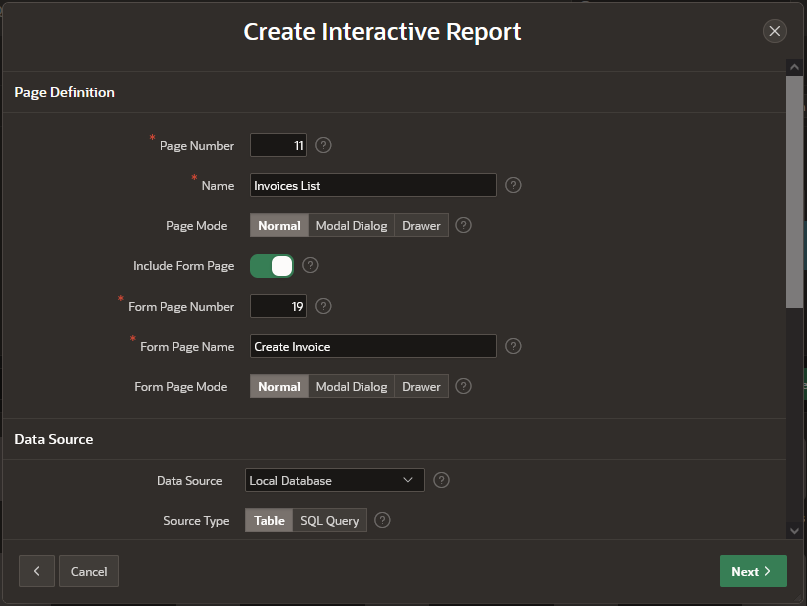
Apex has a Wizard based master detail form which base both master and detail regions on Interactive Grid. But most of the time we need the master region as Form.
In this post we will try to base the Master region on a Form, and the Detail region as an Interactive Grid.
-- Invoices
CREATE TABLE invc_invoices (
invoice_id NUMBER PRIMARY KEY,
--c1 NUMBER GENERATED ALWAYS as IDENTITY(START with 1 INCREMENT by 1),
invoice_date DATE,
due_date DATE,
status VARCHAR2(20), -- 'draft', 'sent', 'paid'
total_amount NUMBER,
);
-- Invoice Items
CREATE TABLE invc_invoice_items (
item_id NUMBER PRIMARY KEY,
invoice_id NUMBER NOT NULL,
description VARCHAR2(200),
quantity NUMBER,
unit_price NUMBER,
FOREIGN KEY (invoice_id) REFERENCES invc_invoices(invoice_id)
);
enter the primary key.
Just Run it. we have a interactive Report with a button on Right Top Create, this will open a Form.
Clicking on Create Button, the Entry form will open.
This is Master Region
We will create the invoice lines now.
Right click on create invoice (region) and select "Create Sub Region".
Edit the sub region "New" in property window.
In Tab Region
Name: Lines
Type : Interactive Grid
Table Name: INVC_INVOICES
Where Clause: INVOICE_ID = :P19_INVOICE_ID
Page Items to Submit: P19_INVOICE_ID
In Tab Attributes
Enabled: Yes
Add Row if Empty: No
Toolbar
Add Button Lable: Add Line
Now select Invoice_id column in create invoice (master region) and edit the properties, the invoice_id is Primary Key in our master table.
Default
Type : SQL Query Return single value
SQL Query Return single value:
SELECT NVL(MAX(INVOICE_ID),0)+1 FROM INVC_INVOICES
Now select the invoice_id column in lines (region) and edit the properties, the invoice_id is a foreign key in our lines table.
Default
Type : Item
Item : P19_INVOICE_ID
On the Right Bottom there is a button "Apply Changes"
In design mode this in buttons area.
Select this button and edit the properties
Lable: Save
Behavior
Database Action: SQL Insert Action
Now we can make entry in our invoice form.
We can hide the invoice_id in master region and details region.